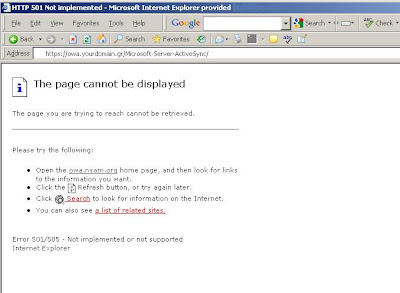
Technical issues with IIS, OWA, other web based email services and even email clients such as Outlook can be resolved remotely.
Software for Online Computer support can help resolve problems remotely. More often than not, user experience is increased by enabling your support team to have on-demand remote access to desktop computers and server. The more methods there are to test, the more likely the problem you're working on can be resolved with certainty and assuredness.
The URL could even be http if SSL is not configured on the server to be required.
For Exchange 2007 and Outlook Web Access 2007, the error 501 and 505 seen on the page displayed is actually normal and should be the response the browser receives from the web server. After all, it's not a mobile phone it's a browser.
Although the error massage has changes slightly in windows server 2008 and windows server 2008 R2, it is very similar. The URL for testing ActiveSync is still in new versions of Exchange. Microsoft Exchange 2007 and Microsoft Exchange 2010 still use the same service point with the IIS web server structure and virtual directories.
To the remote user and to the smartphone it's still the same. underneath, server side, there have been many changes to Internet Information Services. In Windows server 2008 and 2008 R2, IIS has undergone many functional and interface changes for server administrators. When trying to setup a smartphone or mobile device, iPad or iPhone for ActiveSync to get email from an Exchange server, the URL is still the same. The URL that can be used to test active sync access and connectivity is the same and can be tested bot internally and externally. The difference being of course what name is entered into the browser and support for internal and external access is the same as well.
Since the writing of the above article Exchange and email hosting has changed dramatically. There are fewer installations of Exchange servers on-premises, and the use of hosted email or online exchange has increased tremendously. I'm personally not a huge proponent of hosted everything. Once hosted, the hosting company essentially has a key control of your destiny and future. I do understand the need, convenient use, and the economics of hosting. The use of hosting services is invaluable. The are still those who have their own servers in their server rooms and data closets. In addition, there are companies that have their servers hosted in a cloud whereby the server is still theirs essentially, it's not just a service but a windows server that's accessible as if it was present in their own server room. A convenient method for accessing those servers has still remained to be RDP (remote desktop protocol).
Managing RDP Connections
RDP access is used extensively by network and server administrators all across the world. Small and large IT departments benefit from using RDP. Initially part of Microsoft's NT Terminal server which was a separate independent edition of Microsoft Windows server. RDP was then implemented as an add-on service feature of windows server. The RDP was added to desktops such as the pro editions of Windows, RDP is widely used to access servers in their own closest or hosted in a cloud. RDP provides benefits that on the surface assist in accessing and managing servers remotely. RDP protocol helps with troubleshooting issues with file servers, email servers, or other enterprise servers such as domain controller servers for Active Directory and more. RDP clients have been developed for macOS and Linux systems. There are even RDP protocol clients for android and tablets. Managing RDP connections can be achieved by using installable desktop software or a better method for accessing RDP connections is online using a browser. Managing RDP connection is beneficial to all administrators and also could be useful for standard general users of desktop. Since the RDP protocol has been implemented into the pro editions of the windows desktop operating system, RDP connectivity has bee made available for general purpose productivity and application use by users. Managing RDP connection can be centralized with the proper software tool. An RDP manager can provide access in a centralized manor to RDP connection made available to administrator and user.
https://4RemoteSupport.com software for managing RDP connections centrally is 100% online and compatible with macOS, Linux and MS Windows and virtually any device can manager RDP connections.
RDP Connection Manager
Microsoft has since initial inception of RDP and terminal server RDS gateway. remote desktop Gateway is a method for network and server administrators to provide a centralized location for users to access to connect to RDS (Remote desktop Service) servers or their own desktops. Independant of RDS gateway are RDP connection manager software tools that enable administrators and server admins to give access for themselves and for users An RDP connection manager software centralizes connections. RDP connection manager software that's completely online further simplifies access to RDP connections for administrators and general users by offering a single point of connectivity and predefined connections 4RemoteSupport has a RDP Connection manager software tool that enable A centralized RDP manager, that also simplifies managing and connecting to desktops and services through a simple UI. Administrators can add new connections in seconds and are available to other administrators or users immediately. RDP connection manager software tool by 4RemoteSupport creates RDP files "on the fly". When a connection attempt is made using one of the saved RDP connections, a file is created and downloaded through the browser's standard file download interface. There's no need to save RDP files on servers, or on web sites. there's no way for a hacker to get all connections because they are automatically crated and downloaded each time the RDP connections are accessed by an administrator or user. RDP connection manager software that saves files requires exporting. managing RDP connections using an RDP connection manager that's online instead of installed on a desktop provides faster easier access to RDP connections with a centralized easy t use interface that benefits administrators and general users of RDP.
https://4RemoteSupport.com RDP Connection manager is a software tool that doesn't require installation for centralized RDP connection management with a simple browser UI securely.


