Technology has become not just a part of everyday life, but has nearly consumed it for many people. People most especially effected by the technological infiltration of into all corners of life have been the
computer desktop and server support professionals.
Once, during the earlier days of the transition from the non-tech every living to the days of all things technology, the requests for assistance with a technological hurdle by a co-worker were mostly confined to the the office. With the people who really were into technology taking on tech challenges after the work day completed. Most other folks who left the office would go home to their non high tech life styles and do whatever they did without the burden of clicking or touch screening or scrolling on any thing. Now, it's not just the techies who go home and tinker with high tech devices, it's a larger percent of the population.
It started with the home computer users then the casual surfers and now it's become an unstoppable train of technology that's effecting most aspects of life. It's not just the pros or business owners who can't stop working, it's all ages and types. It seems one of the most natural tendencies for humans is to interact with their own kind. To communicate to someone what they are thinking, what they are doing or planning to do. This need to communicate has gone far beyond the instant messengers, of which there are dozens, all fighting for users to slam ads into the faces of, to text messaging. This all doesn't stop on the computers as we know. Just recently in a big provider phone store, I noticed that there were no phones left that were a basic calling device. They all had cameras, video, Internet access, beautiful color screens, loads of graphics and capabilities. They are becoming more like mini computers. Traditional computers just have people stuck in one place mostly as they are to large to just slip into a pocket and go.
All the capabilities are now being stuffed into more mobile devices and they are selling with no slow down in sight. All to just satisfy the need to communicate in some fashion whether words or pictures, with someone else. Support, and
remote support (briefly covered in a
prior post), for these devices has changed also. Especially the mobile workers. They once had a computer that was connected to (I won't say dial-up Internet connections or dial-up connections directly to the office) but to the Internet and they someway connected into the company network and they did their work. Now remote or mobile workers have voice too on their desktops at home or wherever they're travelling (more stuff to support). Internet speeds provided by ISP providers are astonishing and almost imaginable in the early years of the Internet evolution.
Computer support mostly took place during regular business hours with the occasional call form the work-aholic from home. Now, support calls come from all directions and from many "regular" computer users. They are from the most simplest of problems to diagnose and troubleshoot to more complicated networking or application issues.
Computer remote support software has changed too to match the needs of the mobile and remote work force. Once, a simple computer remote support application was installed on the computer that was located at home, and really didn't move, and the tech could just "dial-in" with
computer support software and have remote control of the computer to fix the problem. The
computer remote support software application was non-changing the connection didn't change much and was almost always available and the same. Now
computer remote support has changed to include PDAs, tablet PCs, desktops of course, computers, towers, servers, dynamic IP addresses, static addressing, etc. It's like hitting a moving target as many users will even have more than one computer to work from. The days of
computer remote support software just being on a single computer that didn't move and changed really slowly have evolved into a frenzy of quickly asserting where the person is and what's their connection speed and how to connect quickly.
Although many older users still refer to remotely connecting to computers as "dialing-in" it has come far from the ancient tones and flickering light of modems and dial-up connection times. especially when considering that a phone can have more bandwidth that the old computers once did.


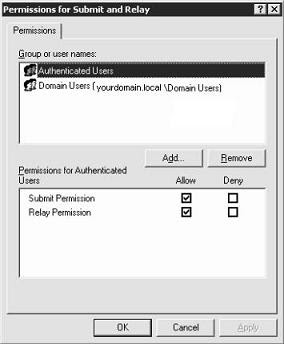 Make sure you enable Relay Permission for your users. In the case where I was getting these NDRs, the Authenticated users group was displayed with the Relay Permission enabled but that wasn't enough. I added the Domain Users group and enabled relay for the group. Save your changes and give it a try.