Showing posts with label router. Show all posts

Tuesday, May 23, 2006

After all the warnings about using Kentrox Q-Series

I have to take some of the negativity back regarding the kentrox q series router. After all the warnings about getting these units for VoIP, it turns out my company purchased several more for a customer who has two NEC Aspire phone systems, one each located in their offices in Washington and the other in Texas. The telephony systems ahve VoIP capabilities and the two systems will be networked for extension transferres and centralized voice mail. I had to get them up and running behind XO's IADs that they installed on the customer premises. I setup remote access to both units in case I had to access them over the web - and I did.

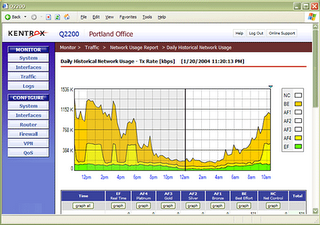
They've improved the graphs a great deal and the speed the graphs are produced. The scale for bandwidth usage is changeable for their x and y axis and the bandwidth graphs if clicked can be opened their own window. They actually seem faster when updating pages or moving from one screen to another.

Although I didn't check their site to see if they have change the cpu or supporting chips they definitely seemed quicker. I don't know how they will work for VoIP since in this case we are connecting the two offices through a VPN and QoS is out the window. The desktop connected to each of the networks just fine though and quite speedily. The IT guy at the office used remote desktop to connect in to the Florida office and said that the connection seemed quicker. Maybe Kentrox has been getting feedback about some of the inadequacies of the previous generation of units and has made some nice improvements.

Graphical QoS reports show application performance and traffic trends at a glance.


Learn more about the Kentrox Q-Series Router


Blog Home - http://remotesupportpc.blogspot.com/

Tuesday, April 04, 2006

Cisco 2811XM Installed fine


A local bank has asked my company to swap out some aging routers for new Cisco 2811XM series routers for the branches and a couple of 3825 series for the core. the first of the branch routers went in today with out a hich. I prepped the router in the office with updates to the IOS and setup the router's start-up and running configuration to match the old router this was replacing. The difference being this unit had different port enumerations. I did call in for some tech support on a DR site branch. I must say Cisco's TAC is not as good as it used to be. below is an image of the 2811XM router. They are bit larger that the 2600 series.

Tech support software to allow remote computer control through the web:


Software for PC Remote Support

Applications such as software for PC remote support allows for access to remote computer users computers through the web for support. Once connected, the technician can work on desktop applications, operating system problems, mis-configurations, or network router (internet routers too). Although most remote support applications won't permit direct remote control access to routers on an internal network, they do get access onto a computer desktop or server that is on the remote local network. From that point, the router can be accessed. Alternatively, SSH (or even less secure Telnet) can be enabled on the router and access from the Internet could be enabled on the edge router/gateway. 4RemoteSupport software for PC remote support provides such a method for access via the Internet. Web based software for PC remote support enables technical support remote access to an internal computer. Once on the remote computer on the remote network, the computer can be used a jump point to the router.  Although web based software options for SSH online applications aren't common, there are installable or desktop based applications for SSH connections to routers. Most SSH implementation are installed 32bit or 64 bit applications such as Secure CRT. Others that are lighter and can run without installing are for example Putty. It is a portable executable application that can just simply be run from a command prompt or by double-clicking the main executable file for supporting devices remotely.

More Info:

Software for PC Remote Support

Previous post entries with similar topic:http://remotesupportpc.blogspot.com/2006/10/remotely-support-desktops-over.html

http://remotesupportpc.blogspot.com/2006/06/remote-support-software.html

Blog:

Evolution of Technology and Support - Desktop Tech Support