A customer who has two Citrix servers in a load balance configuration and for failover has a secure access gateway server as a web front end for remote off-site ICA sessions to the two Citrix servers and the published apps on them. A really mysterious problem developed. Those of you in the field know about these types of problems, they 're the type that just suddenly start happening with no known changes to any systems having been made - they just suddenly start happening. As we all know, something is usaully changed that triggers a problem and especially the "mystery" problems. If it isn't an outright failure of a system or a component of the systems, it's generaly a configuration of something along the path of server and client.
This one is of those types of problems and on Citrix things are often much more complicated that the standard client server applciations. All equipment both networking , PC and server, nothing is known to have been altered. The problem happens when anyone tries to connect to the secure gateway which is the web front end to the citrix server using an optimum online cable modem Internet access. They never get the login prompt (page). Other desktops connecting using other Internet access providers connect with out a problem. It's just optimum online connections that don't work. This was established by remotely accessing desktops on other networks that I have access to and trying to connect to the gateway and then trying to connect to the servers from other networks that were using other ISP services (Internet Service Provider). This is a strange problem that will take some digging and a while to cure.
Tomorrow I'm going to place a network sniffer to monitor and collect information to see what's sending out and in to the server. I'm pretty certain the client request reaches the servers since there's a redirect to an HTTPS page once a connection is made to the server using the normal HTTP. This signifies that the request from the browser (Microsoft IE 6.0) reaches the server which tries to redirect to the secure page. A call will be placed to optimum online as well but I'm sure that will lead to nowhere. They and other providers don't readily admit to anything being wrong and even getting to the level of support where someone would actually know if there was a problem takes great effort. This could easily be a routing problem and not one that's on the Internet but rather an internal problem.
Monday, July 10, 2006

Tuesday, June 27, 2006
Cheap Data Switches with Gigabit Ports.
This is a nice network switch, model SRW2024, which I have had the opportunity to install at customer's offices. 24 switch ports and each can do 10/100/1000. Even if you don't have much need for GB networking to the desktop right now. Most all desktop being shipped now have GB network cards installed in them. Every server I have seen has gigabit network cards as standard. Great bang for the price. Netgear makes some good switches too. I'll get a review in as soon as I can. I'm waiting to checkout some of their new gear.

These switches were added into a proposal to replace 2 48 port Cisco switches that cost over 10,000.00 dollars. These were way cheaper and can do VLANs.
More Features:
- The switch brings gigabit Ethernet speeds affordably to your network, addressing the needs of high bandwidth applications and those of power users
- Increases internal network security; user control is secured via 802.1x port authentication and MAC address filtering
- Enables the entire connected network to be optimized for networked applications, including voice, video and data storage
- Provides intelligent traffic management with rate limiting, policing, shaping, and multicast support
Comes with WebView ready to use. It is a browser based configuration utility that makes it easier to deply and use some of the advanced features.
Review for Online Remote Support Software
For computer remote control software for online desktop remote control and web based pc remote support, there are alternatives to the brand name products that give techs a tool and utility to for providing support to clients and end-users remotely.
Many remote support products require the tech to use the same computer to provide remote support from and if chanegd will require another purchase. Others require them to use the same network and if they need to change, charge them to change the network. A hostname can be used but then that leaves the tech vulnerable for another layer of the solution that could go give them a problem in the future.
Sunday, June 25, 2006
Remote Support Software

Livemeeting is more than conferencing and collaboration software. Microsoft has released a new version of their online meeting software. What many people don't know, is that not only do you get a high quality, top-notch program for online conferences for product demonstrations and demos but tech also get a tool for providing web based desktop and server support through the web.
Help desk remote support system that lets technicians, application support specialists, developers, engineers, etc., remote control for remote support any PC anywhere on the Internet or a local (LAN or private WAN) network anywhere within your organizations network infrastructure and even over virtual networks such as VPNs (Virtual Private Networks) or virtual computers (such as VMWare or VirtualPC). It works on-demand in only seconds for faster delivery of pc remote support software.
Allows you to quickly view the desktop (or desktops) of remote client computers and to provide them with fast, high quality support within a minimal amount of time. A remote technical support and training or software demonstration tool that raises the standard of standard support and assists greatly in reducing support costs.
Specializing in remote support software enabling online remote support, computer remote control software, remote assistance and online customer support. Provide online computer remote support to customers or employees. Web based desktop remote support to remote control and support PC desktop computers and server anywhere over the Internet.
Providing online pc remote control software for support call centers and helpdesk groups. Provide support to your employess, customers and/or clients using pc remote control - it's an effective and simple and effective support method for clients and users to have confidence and comfort with your remote support and technical knowledge (expertise).
Allows you to quickly view the desktop (or desktops) of remote client computers and to provide them with fast, high quality support within a minimal amount of time. A remote technical support and training or software demonstration tool that raises the standard of standard support and assists greatly in reducing support costs.
Specializing in remote support software enabling online remote support, computer remote control software, remote assistance and online customer support. Provide online computer remote support to customers or employees. Web based desktop remote support to remote control and support PC desktop computers and server anywhere over the Internet.
Providing online pc remote control software for support call centers and helpdesk groups. Provide support to your employess, customers and/or clients using pc remote control - it's an effective and simple and effective support method for clients and users to have confidence and comfort with your remote support and technical knowledge (expertise).
PC Remote Support
More PC Remote Support Detailed Product Information:
PC Remote Support
Remote desktop control and management through web based online remote pc control software for support and help desk professionals. Useful and simple remote desktop and support software that requries no activex add-on installations into the web browser (that are stopped by pop-up blockers and confuse average computer users). With remote access solutions for small and large tech support businesses, VARs, systems integrators, information technology consultants, etc., and providing full featured software for remote desktop support.
A Summary of the Microsoft Provided Tools Used for the Management of Active Directory.
This is a summary of the Microsoft provided technologies / tools used for the management of Active Directory.
Backup utility
Performs backup and restore operations. It is automatically installed with Windows Server 2003. In Windows Server 2003, the backup utility is Backup.exe. The wizard, or basic mode, is called Backup or Restore Wizard; and in advanced mode, it is called Backup Utility.
Start > All Programs > Accessories > System Tools > Backup
Or to open the Backup tool using the command line:
Start > Run. In the Open box, type ntbackup and then click OK.
DNS Manager
Used for modifying DNS parameters. These centralized management and monitoring tools can be found either in Administrative Tools after initial installation of the DNS service, or through Adminpak.msi.
Start > Control Panel > Administrative Tools
Or to open DNS Manager using the command line, type:
%systemroot%\System32\ dnsmgmt.msc
Active Directory Domains and Trusts Microsoft Management Console snap-in
Used for modifying Active Directory domains and trusts. These centralized management and monitoring tools can be found either in Administrative Tools after initial installation of the Active Directory, or through Adminpak.msi.
Start > Control Panel > Administrative Tools
Or to open the MMC snap-in using the command line, type:
%systemroot%\System32\ domain.msc
Active Directory Installation Wizard
Used to promote or demote a domain controller.
Start > Run > dcpromo
Active Directory Schema snap-in
Used for modifying Active Directory schema. This tool does not appear by default in Administrative Tools.
Open the MMC snap-in using the command line, type:
%systemroot%\System32\ schmmgmt.msc
Active Directory Sites and Services MMC snap-in
Used for modifying Active Directory sites and services. This centralized management and monitoring tool can be found either in Administrative Tools after initial installation of the Active Directory, or through Adminpak.msi.
Start > Control Panel > Administrative Tools
Or to open the MMC snap-in using the command line, type:
%systemroot%\System32\ dssit.msc
Active Directory Users and Computers MMC snap-in
Used for modifying Active Directory users and computers. These centralized management and monitoring tools can be found either in Administrative Tools after initial installation of the Active Directory, or through Adminpak.msi.
Start > Control Panel > Administrative Tools
Or to open the MMC snap-in using the command line, type:
%systemroot%\System32\ dsa.msc
Adsi edit MMC snap-in
Used for editing Active Directory to add, delete, or move objects within the directory. This centralized management and monitoring tool can be found either in Administrative Tools after initial installation of the Active Directory, or through Adminpak.msi.
Open the MMC snap-in using the command line, type:
%systemroot%\System32\ adsiedit.msc
Dcdiag.exe
This command line tool analyzes the state of domain controllers in the forest or enterprise and reports any problems to assist in troubleshooting.
Start > Run > dcdiag.exe
Event Viewer
Provides logs for transactional reactive reviews of system and service events. It is automatically installed with Windows Server 2003.
Start > Control Panel > Administrative Tools > Event Viewer
Or to open Event Viewer using the command line:
Start >Run. In the Open box, type eventvwr.msc and then click OK.
Ldp.exe
Used to connect, bind, search, modify, add, and delete against any LDAP-compatible directory such as Active Directory. Used to view objects stored in Active Directory along with their metadata.
Start >Run. In the Open box, type ldp.exe and then click OK.
Net.exe
A set of commands for a variety of tasks, such as managing user accounts and computer accounts, sending messages, and managing shared resources.
Start > Run > cmd at the command prompt, type net to see options
Netdiag.exe
Helps isolate networking and connectivity problems by performing a series of tests to determine the state of the network client.
Start > Run > cmd at the command prompt, type netdiag /? to see options
Netdom.exe
Enables administrators to manage Windows 2000 and Windows Server 2003 domains and trust relationships from the command line.
Start > Run > cmd at the command prompt, type netdom /? to see options
Nltest.exe
Helps you get a list of domain controllers, force a remote shutdown, and query the status of trust relationships.
Start > Run > cmd at the command prompt, type nltest /? to see options
Ntdsutil.exe
Used to perform database maintenance of Active Directory, manage and control single master operations, and remove metadata left behind by domain controllers that were removed from the network without being properly uninstalled.
Start > Run > cmd at the command prompt, type ntdsutil /? to see options
Registry Editor
Enables you to view and change settings within the registry.
Start > Run > regedit
Repadmin.exe
Command line tool that helps administrators diagnose replication problems between domain controllers.
Start > Run > cmd at the command prompt, type repadmin /? to see options
Secedit.exe
Configures and analyzes system security by comparing current configuration with at least one security template.
Start > Run > cmd at the command prompt, type secedit /? to see options
Services snap-in
MMC snap-in that allows you to start, stop, or restart Windows services.
Start > Run > MMC > Services.msc
Ultrasound
A tool that allows administrators to monitor the health of the file replication service (FRS).
See www.microsoft.com/homepage/ms.htm for more information on the Ultrasound utility.
W32tm.exe
A tool used to diagnose problems having to do with Windows time.
Start > Run > cmd at the command prompt, type w32tm /? to see options
Referenced from: http://www.microsoft.com/technet/itsolutions/cits/mo/winsrvmg/adpog/adpog2.mspx
Backup utility
Performs backup and restore operations. It is automatically installed with Windows Server 2003. In Windows Server 2003, the backup utility is Backup.exe. The wizard, or basic mode, is called Backup or Restore Wizard; and in advanced mode, it is called Backup Utility.
Start > All Programs > Accessories > System Tools > Backup
Or to open the Backup tool using the command line:
Start > Run. In the Open box, type ntbackup and then click OK.
DNS Manager
Used for modifying DNS parameters. These centralized management and monitoring tools can be found either in Administrative Tools after initial installation of the DNS service, or through Adminpak.msi.
Start > Control Panel > Administrative Tools
Or to open DNS Manager using the command line, type:
%systemroot%\System32\ dnsmgmt.msc
Active Directory Domains and Trusts Microsoft Management Console snap-in
Used for modifying Active Directory domains and trusts. These centralized management and monitoring tools can be found either in Administrative Tools after initial installation of the Active Directory, or through Adminpak.msi.
Start > Control Panel > Administrative Tools
Or to open the MMC snap-in using the command line, type:
%systemroot%\System32\ domain.msc
Active Directory Installation Wizard
Used to promote or demote a domain controller.
Start > Run > dcpromo
Active Directory Schema snap-in
Used for modifying Active Directory schema. This tool does not appear by default in Administrative Tools.
Open the MMC snap-in using the command line, type:
%systemroot%\System32\ schmmgmt.msc
Active Directory Sites and Services MMC snap-in
Used for modifying Active Directory sites and services. This centralized management and monitoring tool can be found either in Administrative Tools after initial installation of the Active Directory, or through Adminpak.msi.
Start > Control Panel > Administrative Tools
Or to open the MMC snap-in using the command line, type:
%systemroot%\System32\ dssit.msc
Active Directory Users and Computers MMC snap-in
Used for modifying Active Directory users and computers. These centralized management and monitoring tools can be found either in Administrative Tools after initial installation of the Active Directory, or through Adminpak.msi.
Start > Control Panel > Administrative Tools
Or to open the MMC snap-in using the command line, type:
%systemroot%\System32\ dsa.msc
Adsi edit MMC snap-in
Used for editing Active Directory to add, delete, or move objects within the directory. This centralized management and monitoring tool can be found either in Administrative Tools after initial installation of the Active Directory, or through Adminpak.msi.
Open the MMC snap-in using the command line, type:
%systemroot%\System32\ adsiedit.msc
Dcdiag.exe
This command line tool analyzes the state of domain controllers in the forest or enterprise and reports any problems to assist in troubleshooting.
Start > Run > dcdiag.exe
Event Viewer
Provides logs for transactional reactive reviews of system and service events. It is automatically installed with Windows Server 2003.
Start > Control Panel > Administrative Tools > Event Viewer
Or to open Event Viewer using the command line:
Start >Run. In the Open box, type eventvwr.msc and then click OK.
Ldp.exe
Used to connect, bind, search, modify, add, and delete against any LDAP-compatible directory such as Active Directory. Used to view objects stored in Active Directory along with their metadata.
Start >Run. In the Open box, type ldp.exe and then click OK.
Net.exe
A set of commands for a variety of tasks, such as managing user accounts and computer accounts, sending messages, and managing shared resources.
Start > Run > cmd at the command prompt, type net to see options
Netdiag.exe
Helps isolate networking and connectivity problems by performing a series of tests to determine the state of the network client.
Start > Run > cmd at the command prompt, type netdiag /? to see options
Netdom.exe
Enables administrators to manage Windows 2000 and Windows Server 2003 domains and trust relationships from the command line.
Start > Run > cmd at the command prompt, type netdom /? to see options
Nltest.exe
Helps you get a list of domain controllers, force a remote shutdown, and query the status of trust relationships.
Start > Run > cmd at the command prompt, type nltest /? to see options
Ntdsutil.exe
Used to perform database maintenance of Active Directory, manage and control single master operations, and remove metadata left behind by domain controllers that were removed from the network without being properly uninstalled.
Start > Run > cmd at the command prompt, type ntdsutil /? to see options
Registry Editor
Enables you to view and change settings within the registry.
Start > Run > regedit
Repadmin.exe
Command line tool that helps administrators diagnose replication problems between domain controllers.
Start > Run > cmd at the command prompt, type repadmin /? to see options
Secedit.exe
Configures and analyzes system security by comparing current configuration with at least one security template.
Start > Run > cmd at the command prompt, type secedit /? to see options
Services snap-in
MMC snap-in that allows you to start, stop, or restart Windows services.
Start > Run > MMC > Services.msc
Ultrasound
A tool that allows administrators to monitor the health of the file replication service (FRS).
See www.microsoft.com/homepage/ms.htm for more information on the Ultrasound utility.
W32tm.exe
A tool used to diagnose problems having to do with Windows time.
Start > Run > cmd at the command prompt, type w32tm /? to see options
Referenced from: http://www.microsoft.com/technet/itsolutions/cits/mo/winsrvmg/adpog/adpog2.mspx
Wednesday, June 21, 2006
Wall jack for network not working
Sad but true. What seems to some of us, who are of the tech support persuasion, to be the simplest of problems people are willing to pay for. I had a customer today that originally called because of a wireless problem (I'll get to that later) but while I was there they mentioned another problem. There were two wall jacks that they claimed weren't working. They in fact weren't. I checked them both with my laptop and my own patch cord - neither connected. Not even a link light on my network adapter. I toned out the line to see what port they were terminated on in their data room. Well, well, well... there was no patch cord connecting neither port on the patch panel to any data switch. I popped one on and viola I connected. I toned the second line out and it was the same problem - no network cord connecting the patch panel termination of the data run to the network switch. They paid for this. Just by applying some simple troubleshooting and basic knowledge would have resolved that network problem in-house.
It was an easy day so far - except I was in the city in the afternoon which meant a 2 hour ride home. I took on the wireless problem - this get a little more mysterious.
It was an easy day so far - except I was in the city in the afternoon which meant a 2 hour ride home. I took on the wireless problem - this get a little more mysterious.
Friday, June 16, 2006
Reliable Technical Support
.jpg)
I came across this site and started quickly reading/scanning the pages contained within and saw there were a number of links, good articles, and useful information. I noticed that one of the items listed was a online remote support software solution that I have signed up for. So I figured why not throw in a post.
The software for remote support is pretty good as an online solution for remotely supporting computers through the web and as an alternative to the more pricey brand names of remote support. The service is reliable for remote controlling computers over the web for support. Yes, it's an affordable remote support solution. Solutions for remote desktop support consist of products and online services that range from a little application to full blown, require dedicated server type solution that's costs thousands upon thousands of dollars per user or seat. This solution for remote online remote support is pretty inexpensive. One of the newly added features consists of allowing their users to send a remote support email link right from their site - while your logged in of course.
The feature list isn't tremendous compared to the more pricey well known solution but if it's remote control over the web you need, that's what you get.
Remote Desktop Support Software
Too many packages and solutions for remote control support that are available offer their service or product with maintenance fees and hidden charges. At one time I even remember seeing a site that charged per usage and another that charged by the minute. That's easy grey area for contention as there are ways that the information provided could be misleading or incorrect.
PC Remote Support
This site has a single flat rate and no charges for changing support computers or networks. The appliance based remote support solutions are nice too as they offer the fact that you own your solution for supporting computers. This is nice but you will pay forever the maintenance fees for the appliance and if you don't, you get no updates or support if there's a problem - you may own it but you'll never stop paying for it.
More...
Web based PC Remote Support
Saturday, June 03, 2006
InformationWeek | News | Ballmier: 'A Lot Of Work To Do' On Vista | June 2, 2006
InformationWeek News balmier: 'A Lot Of Work To Do' On Vista June 2, 2006
Just as with the release of XP. There were some negative reviews but the final product differed from the beta version and a service pack or two later, it differed even more by having features that critics were claiming were missing.
Sponsored Link:
Remote Support Software
Just as with the release of XP. There were some negative reviews but the final product differed from the beta version and a service pack or two later, it differed even more by having features that critics were claiming were missing.
Sponsored Link:
InformationWeek | Microsoft Windows, CRN Test Center | Windows Vista Beta 2: An Improvement? | May 23, 2006
InformationWeek Microsoft Windows, CRN Test Center Windows Vista Beta 2: An Improvement? May 23, 2006
CRN test center reviews beta 2 release of Windows Vista. I have not tried the OS yet but I'm looking closly at what the reviews are reporting. Support for hardware and drivers is an issue again just like when XP was being readied for release.
CRN test center reviews beta 2 release of Windows Vista. I have not tried the OS yet but I'm looking closly at what the reviews are reporting. Support for hardware and drivers is an issue again just like when XP was being readied for release.
Tuesday, May 23, 2006
After all the warnings about using Kentrox Q-Series
I have to take some of the negativity back regarding the kentrox q series router. After all the warnings about getting these units for VoIP, it turns out my company purchased several more for a customer who has two NEC Aspire phone systems, one each located in their offices in Washington and the other in Texas. The telephony systems ahve VoIP capabilities and the two systems will be networked for extension transferres and centralized voice mail. I had to get them up and running behind XO's IADs that they installed on the customer premises. I setup remote access to both units in case I had to access them over the web - and I did.
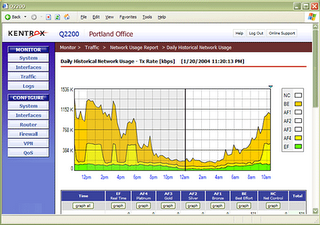
They've improved the graphs a great deal and the speed the graphs are produced. The scale for bandwidth usage is changeable for their x and y axis and the bandwidth graphs if clicked can be opened their own window. They actually seem faster when updating pages or moving from one screen to another.
Although I didn't check their site to see if they have change the cpu or supporting chips they definitely seemed quicker. I don't know how they will work for VoIP since in this case we are connecting the two offices through a VPN and QoS is out the window. The desktop connected to each of the networks just fine though and quite speedily. The IT guy at the office used remote desktop to connect in to the Florida office and said that the connection seemed quicker. Maybe Kentrox has been getting feedback about some of the inadequacies of the previous generation of units and has made some nice improvements.
Graphical QoS reports show application performance and traffic trends at a glance.
They've improved the graphs a great deal and the speed the graphs are produced. The scale for bandwidth usage is changeable for their x and y axis and the bandwidth graphs if clicked can be opened their own window. They actually seem faster when updating pages or moving from one screen to another.
Although I didn't check their site to see if they have change the cpu or supporting chips they definitely seemed quicker. I don't know how they will work for VoIP since in this case we are connecting the two offices through a VPN and QoS is out the window. The desktop connected to each of the networks just fine though and quite speedily. The IT guy at the office used remote desktop to connect in to the Florida office and said that the connection seemed quicker. Maybe Kentrox has been getting feedback about some of the inadequacies of the previous generation of units and has made some nice improvements.
Graphical QoS reports show application performance and traffic trends at a glance.
Learn more about the Kentrox Q-Series Router
Blog Home - http://remotesupportpc.blogspot.com/
Friday, May 05, 2006
Dell to add 1,000 jobs at Ottawa customer service, technical support site
Source: 680News
May 5, 2006
Dell Inc. is adding 1,000 jobs at its newly opened customer and technical support office in Ottawa, tripling the projected workforce to 1,500, the computer giant's Canadian subsidiary said Friday.
The Ottawa site, operational since February, is one of several customer contact centers that the Texas-based company has opened around the world, including in the United States, Philippines and India.
May 5, 2006
Dell Inc. is adding 1,000 jobs at its newly opened customer and technical support office in Ottawa, tripling the projected workforce to 1,500, the computer giant's Canadian subsidiary said Friday.
The Ottawa site, operational since February, is one of several customer contact centers that the Texas-based company has opened around the world, including in the United States, Philippines and India.
Subscribe to:
Posts (Atom)