Sunday, April 23, 2006
Software for Remote Support - Blog
The entry in this blog describes an online remote support software solutions. http://spaces.msn.com/remotesupport/blog
This next blog is similar to this one in that it has entries from a tech support person invloved in day to day activities while problem solving pc and network issues. This guy has it toough or great depending on how one looks at it. He is all over the place. He not only does computer desktop support, but also does networking design and troubleshooting plus VoIP (voice over IP). That is a lot of technology to be involved in at once but like I said it depends on how it is looked at. The one thing that I do have a problem with is that he has my posting name and I can't do anything about it. http://bloglines.com/blog/Puppet

Thursday, April 20, 2006
Kentrox Q2200 & Q2300 - Remote Desktop Access

This notification email is intended to inform everyone in our company involved in the selection or ordering of networking gear for VoIP solutions.
As we know, our company has deployed many VoIP solutions. As time and the number of deployments has increased, our internal VoIP knowledgebase has incremented accordingly. Although the phone system brand per deployment may differ, the underlying networking equipment is often from the same manufacturer and in many cases, the same manufacturer model. Although in some respects debatable, several of the most problematic VoIP deployments include Kentrox networking equipment installed as part of the solution.
A common denominator in both point-to-point and VPN flavored VoIP installs that have been the most troublesome are Kentrox models Q2300 and Q2200. Although both units price very competitively, the gains achieved with the low upfront cost have been negated due to technical overhead applied in efforts solve poor voice-over-ip quality issues. More intangible but not to be ignored, is the cost to the company's reputation of delivering solid VoIP solutions. Although it's not a guaranty that another vendors equipment would have not resulted in similar issues, the uncertainty and doubt in future VoIP deployments arising from the Kentrox units having been involved in past problem deployments is certain.
It's recommended that Kentrox models Q2200 and Q2300 are no longer included in proposals for neither point-to-point or VPN VoIP solutions. They can still play a role as an inexpensive T1 CSU/DSU router/firewall for single ISP internet access but even for those solutions another vendors equipment, such as product offerings from Adtran or Cisco, may price equally as well and should be considered.
VoIP Quality :: Network Connection & Access
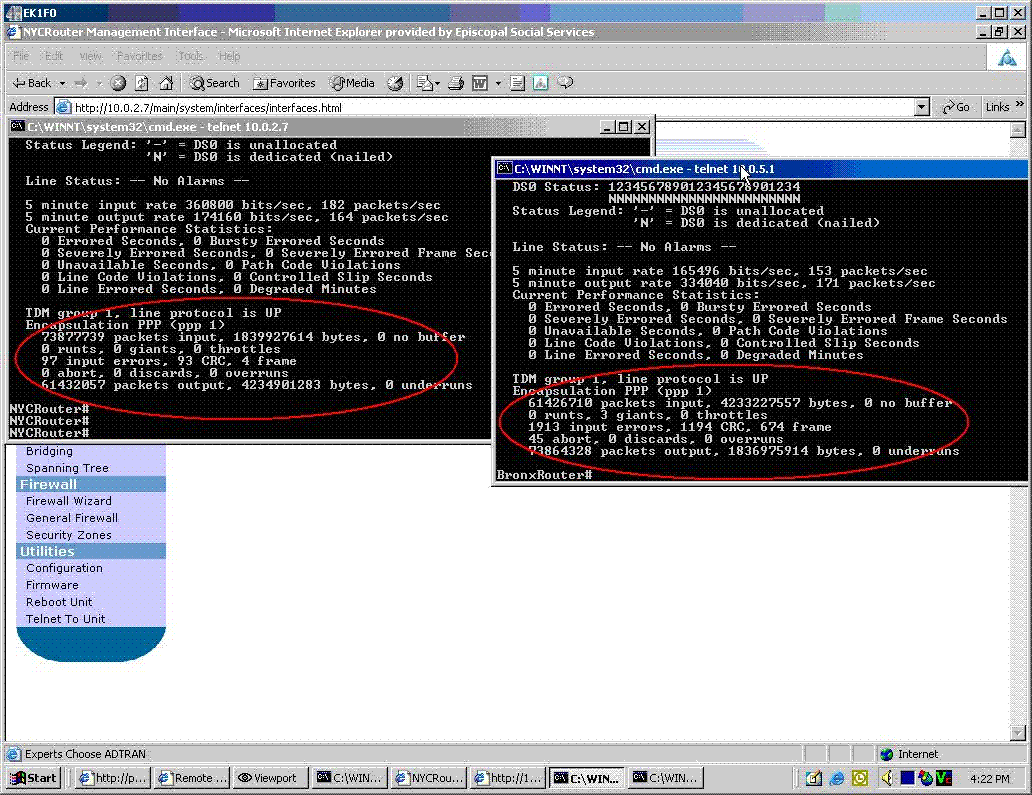
So far:
Wednesday April 19th - 4:00pm to 5:15pm
The image above shows numerous CRC and frame errors as reported by the Adtran units that connect the point-to-point T1. The count is higher on the Bronx side (right side of the image). I cleared all of these stats when I was last logged on a week and half to two weeks ago so I am sure they have all occurred since then. I cleared them again yesterday. After clearing the statistics, I started a file download from a desktop in the Bronx the to a desktop I was logged into in Manhattan and while the download was taking place, asked ESS to place a call to the Bronx. Unfortunatly, the counters did not increment as quickly as I expected. There was only one CRC and one Frame error on the Bronx side. However, this is still an indication that there are line problems.
I checked the configurations on the NEC systems and the Adtran units and they are as I left them. I can only verify configurations for the aforementioned equipment since I viewed for accuracy or adjusted the configurations to provide acceptable voice quality the last time this issue was addressed. I cannot say other devices or new devices on ESS's network are not causing a problem. ESS did inform me that Verizon was in thier phone room for two days though it was not disclosed to me what work they were performing. Charles was also at ESS just recently but was there for training and not modifying the configurations of the NEC phone systems.
Sent: Wednesday, April 19, 2006 6:31 PM
Subject: S-ESS
Please be sure to inquire of the hrs spent today on the ESS problem . I want you to track and bill the customer for this IT time.
Also the client s/b made aware that if we work on this tomorrow or the next that the time is and will be billable.
Please acknowledge.
Thank you.
Tuesday, April 11, 2006
Netvanta Desktop or Rack Mount Chassis Router
 Netvanta Desktop or rack mount chassis Router
Netvanta 3200 Series router is a very versatile and feature rich device for networking both poin-to-point type connections between offices and for internet gateways. The model comes in both desktop and rackmount flavors. The current release of their software is 12.x. Almost all common or general configuring can be done from the GUI which is browser based. With version 12 QoS could be configured using a wizard. If you prefer command line their OS is ver similar to Cisco's IOS. That feature was an intelligent design for ADTRAN to commit to as the learning curve to maneuver around on the unit if the GUI is inaccesable is very small. The unit can be accessed remotely for remote configuration through telnet or a browser.
Compare the Netvanta 3200 to Cisco 1700
Saturday, April 08, 2006
Benefits of Online Remote Access PC Support.
Online PC Remote Support Software
The cost saving benefits of remote control software are easily calculated. Anyone can derive from the use of remote support software the numerous advantages from just the description of such software. Online PC remote support software such as 4RemoteSupport permits the remote control of computers on the Internet. By gaining access and control of a remote computer for support, countless tech support functions can be performed so much quicker than by having to visit the site or office or attempt to diagnose and solve problems over the phone. As is the case often, the tech may know what the problem is but guiding an inexperienced computer user or even worse, an unwilling participant, to click on different windows and menus and then communicate information back to the tech support person on the phone often makes what could be 10 support session turn into 5 times that amount of time.Remote control desktops over the web through the internet can save precious time and from a business aspect that means dollars. Efficiency of support staff increases many fold and remote control software or on-demand remote desktop support solutions cost much less than adding salaries.
Remote Support Software
Many of the major hardware and software vendors are using on-demand remote support software to increase their profit margins and stay competitive within their market segment. Vendors such as dell, Cisco, hp, and others are committing large amounts of money into online remote support solutions but in the end, save many times what they spend (almost forgot to mention Microsoft - RDP?). RDP for remote control is also one of my favorite solutions for PC remote control over the web. The problem I have with it at times is the need to have access and control of the networking equipment at the remote side to make the changes needed to allow the applications communication through to the inside network. Although, I must add that dell dropped it's remote support solution after having some great complications with it. They may have been too early to adapt such a strategy and the pc os platform was switching from me to 2000.Thursday, April 06, 2006
Quick Remote Desktop
Cost is also not an issue compared to huge businesses. However, since they cannot allocate the required budgetary funds to initiate a huge marketing campaign for their remote support software solution and computer services, it is hard to find one.
Computer remote control on the web
The new and rapidly growing trend in computer support and consulting seems to be that of remote support. In particular, the ability to provide quick remote desktop support through computer remote control on the web. Although computer remote control on the web for online remote support is not a new concept in theory or practice, the number of support professionals looking to provide their own without the extra effort that was once involved to gain remote access to a system over the web has grown tremendously. This is not a short term fad, this is a business tool for the support industry. The number of services and packaged support products available on the market today to choose from is tremendous. IT support companies have come to realize and recognize that to be competitive in business, they need visibility and be seen nationwide and even world wide. They should offer affordable services without sacrificing quality. http://spaces.msn.com/4remotesupport/ Through the use of remote support software, companies have become successful connecting to their clients without the need of travel. This setup is both beneficial to the company and the consultants. 4RemoteSupport is one of the companies pursuing this business model. Need more information. Obtaining remote support tools to remote control computers on the web is not just sought out for companies that provide support to their customers, this support tool service is seeing tremendous growth with IT departments or organization that support only their own employees and staff.Tuesday, April 04, 2006
Cisco 2811XM Installed fine

A local bank has asked my company to swap out some aging routers for new Cisco 2811XM series routers for the branches and a couple of 3825 series for the core. the first of the branch routers went in today with out a hich. I prepped the router in the office with updates to the IOS and setup the router's start-up and running configuration to match the old router this was replacing. The difference being this unit had different port enumerations. I did call in for some tech support on a DR site branch. I must say Cisco's TAC is not as good as it used to be. below is an image of the 2811XM router. They are bit larger that the 2600 series.
Tech support software to allow remote computer control through the web:
Software for PC Remote Support
Applications such as software for PC remote support allows for access to remote computer users computers through the web for support. Once connected, the technician can work on desktop applications, operating system problems, mis-configurations, or network router (internet routers too). Although most remote support applications won't permit direct remote control access to routers on an internal network, they do get access onto a computer desktop or server that is on the remote local network. From that point, the router can be accessed. Alternatively, SSH (or even less secure Telnet) can be enabled on the router and access from the Internet could be enabled on the edge router/gateway. 4RemoteSupport software for PC remote support provides such a method for access via the Internet. Web based software for PC remote support enables technical support remote access to an internal computer. Once on the remote computer on the remote network, the computer can be used a jump point to the router. Although web based software options for SSH online applications aren't common, there are installable or desktop based applications for SSH connections to routers. Most SSH implementation are installed 32bit or 64 bit applications such as Secure CRT. Others that are lighter and can run without installing are for example Putty. It is a portable executable application that can just simply be run from a command prompt or by double-clicking the main executable file for supporting devices remotely.More Info:
Software for PC Remote Support
Previous post entries with similar topic:http://remotesupportpc.blogspot.com/2006/10/remotely-support-desktops-over.htmlhttp://remotesupportpc.blogspot.com/2006/06/remote-support-software.html
Blog:
Evolution of Technology and Support - Desktop Tech Support
remote support
Yes, the lingo could definately be confusing.
I want to be sure the service would be a fit for what you are trying
to do.
What the system provides is a mechanism or a way to get control of a
remote computer over the internet. The remote computer's user logs
into the site using your email address. Once logged in, they are
presented with a connect button and a download program link. These
both do the same thing but go about it differently. They click on the
connect button and remote control software downloads to their computer
and with pre-configured information, that's the information you enter
on your profile page, and automatically connects to your computer
running the viewer. Your viewer pops open on your computer and you
see and can control thier computer. If the automatic download fails,
this will happen if they do not have Java installed, they can run the
executable program wich will also connect automatically to your viewer
with pre-configured information.
Now, the port forwarding is the part that does confuse some people. I
have to add at this point that we are working on a major update to
remove this requirement, I have no release date however. On your
router, in your case a netgear, a port forward or virtual server is
setup. What this does is it allows the remote computer's software
that's downloaded to get through to your computer from the internet
side of the router to your computer on the LAN.
Every progrma that communicates on a network uses and IP address and a
port. It's not a real port it's a software port. This is how the
computer knows what software is talking to or listening to the
network.
So on the netgear, the only requirement is that software communicating
on port 5500 (the default) from the internet is forwarded to the
computer on the LAN that has the viewer listening for it. The port
is forwarded to the IP address of the computer on the LAN. Usually
addressed with the last number changing like you described - .1, .2,
.3. . A complete address as an example will look like 192.168.1.1,
192.168.1.2, 192.168.1.3, etc..
So a cumputer on your local LAN will have the viewer running on it and
listening on port 5500 for connections from computers that "want" to
remote controlled. The netgear will have the port forward configured
to point 5500 to the IP address of the computer with the viewer on
your LAN. When a remote user logs in with your email address and
clicks connect, software downloads to their system and connects to
yours and you control thier computer.
The security is such that if anyone connects to you, your viewer, you
have control of them and not the other way around. You could always
exit the viewer once a session is complete to feel more secure. Once
a session is active, no one can steal the session or redirect it.
Although the remote control software we use has the capability of
encryption we don't apply it although we may add a checkbox on the
profile page to permit our customers to turn it on or off as they
require. The encryption makes the software run much slower. This is
not just our system, it's everyones even the very expensive flavors.
Our sessions are quick. You could pay 1,000.00 plus more for another
service that is doing encryption right now but it won't be faster I
have to caveate the last comment with the fact that network
conditions make a difference too. The encryption really has not
worried our current base since they know that encrypting a stream
that is just them remote controlling a computer to fix a printer
setup or the end-users email program or any other common support
issue isn't a security breach. The end user is already logged in
since they have to be to initiate the download so there's no
passwords being entered to steal - which is unlikely anyone could do
so anyway.
I hope this helped. If you have more questions please ask them, I will
be very happy to answer them for you.
If you need assistance configuring the netgear, please send me the
model number since the configuration screens differ on different
models. The model number is usually displayed somewhere on the unit.
Thank you,
Customer Support Group
> very interested in your product, how secure is it in protecting information
> while communicating with the remote desktop.
> Also I am running off a router, where do I find a "Viewer Port Number"?
> could that be the .2, .3, or .1 (depending on computer) on the net gear ip
> address?
> I know you say it is simple to set up but when you don't really know the
> lingo you get confused.
> also am I understanding that I just need to install this on the computer I
> want people to have access to?
> Thanks for your help
Friday, March 31, 2006
BGP on 3825 Routers.
I just encountered an opportunity to configure BGP on a couple of Cisco 3825 routers for a potential customer. They are getting two routers and two service providers and just inquired if we do that sort of work. We/I have not but would really like to do it. Our reply was just that. Text book and lab experience but we are very willing to do it for them and we'll discount the labot cost. I have already voluteered for this job and hope to get it. On-demand Remote desktop control over the web for remote tech support .
MyTechSupport.ca - Your Computer Technical Support & Resource Headquarters!
MyTechSupport.ca - Your Computer Technical Support & Resource Headquarters!
Thursday, March 30, 2006
Cisco 2811 Branch Router Install - Remote & On-site Support
This project for the bank is a small piece of a larger project and its scope is straight forward and fairly simple. The bank is a very good long-standing customer and has confidence in our company as I have installed other Cisco gear for them flawlessly. The next attempt at installing this new equipment must be successful to sustain their level of confidence in us. The problem we've encountered with installing this particular branch router seems to be an unusual one as TAC is also, at this point, stumped for a solution.

An aging 2600 series branch router is to be replaced by a more robust and sophisticated multiservice 2811XM router. This branch, as all others, has frame-relay as it's method for wide area connectivity back to the bank's core data center. The branch differs from the others in a single important regard. The difference is that not only does it perform normal banking transactions but it also has an the added role of being a DR site for the meshed frame network. It therefore has additional frame-relay configuration parameters that are not found on the bank's "regular" branch routers. The configuration of the router is a copy of the current 2600. Except for interface enumeration, i.e. Serial 0 on the old compared with Serial 0/0/0 on the new, they are configured near exactly the same. The duplicity of the configuration can especially be seen, and has been re-examined numerous times even by TAC for accuracy and completeness, in the frame-relay and routing protocol sections of the configuration.
PC Remote Control On the Web
The first attempt at installing the router was on the March 15th. With router preparation having been completed at our company's pre-installation staging and lab area prior to the 15th, the next step was to go on-site as scheduled. Accompanied by a senior member of the bank's IT staff, the new branch router was promptly cut-over at 5:00PM. After the router booted and communication test to the core and other branches were performed it was discovered that the router, although functioning with respect to communicating with the other sites, was doing so through the wrong frame-relay path. The slower backup frame-network on the second sub-interface was being used instead of the intended primary interface.


It was determined that the wrong path was in use using basic tools, like trace route, ping and some router commands. Attempts to remedy were unsuccessful and included: re-loading, power cycles, shutting the second sub-interface to force the data path to the primary PVC, re-comparing the configurations removing and re-adding security related entries in the configuration. To be certain that I had not discovered a pre-existing problem with frame network, the old 2600 router was put temporarily back in again to see if it too would only use the back-up PVC. It did not - it used the primary PVC as expected. The 2600 series was removed again and the 2811 was re-connected but without success as all efforts did not return the desired results. TAC was not involved at this point and not until the next day were they contacted. The time window in which to get the new router installed was only an hour. With time having expired the original 2600 was put back into service. The 2811 was removed and returned back to our company's lab and staging area.
Computer Remote Control on the Web
A case was opened with TAC and I described accurately the situation and provided them with information as they requested and included IOS version numbers, results of IOS commands, etc.. The only thing I could not provide was active frame-relay statistics because the router was not connected to the bank's network. TAC could not find anything wrong with the configuration. Between communications with TAC, I connected the router with another 3825 in a standard frame-relay LAB configuration. The 3825 was configured as the frame-relay switch and DCE. After completing that configuration, the primary PVC came right up on the 2811 and I was able to ping across the simulated frame-relay network to the 3825. NO CHANGES were done on the 2811. TAC said to call the carrier to verify the frame-relay switch type and they could not help any further unless I was on-site and connected to the bank's network. They only offered at this pint as a solution to change the LMI type and the encapsulation type. The next install day was scheduled for March 30th.
Online Remote Desktop Support Software
Accompanied again by a member of the bank's IT staff, the router was cut-over after 5:00PM on the 30th. It loaded and operated the same as the week before by using the backup frame-relay and not the primary. I tried the few recommended TAC solutions but they did not yield the desired effect. I added a little attempt of my own by removing the modules that were not yet needed by the bank such as the BRI and the 4 port FXS and restarting (a hale Mary pass?...perhaps). While in transit to the location of the branch, I contacted TAC to have them on the line while on site. They asked for some status data which I sent. The time window for installation was again a small one so the 2600 was put back into service. I still have that case open with TAC and continued working with them today. There is no resolution as of yet. Othe post of Cisco networking gear could be found at Computer Networking News & Reviews and at this location, Evolution of Technology & Support.
Remote Desktop Control on the Web
So at this point I'm going to attemopt to escalate the problem higher in the TAC food chain. This in hopes of getting some people involved that could really address this problem properly as it's cause is not easily explainable and out of the range first level support personel.
I'll post more when it happens.
Subscribe to:
Posts (Atom)